Fraktjakt
Kroconnect
Fraktjakt for WooCommerce – product data for supplementary customs documents
Last modified:
If you sell to countries other than Sweden, there may be a need to print more shipping documents than just shipping labels. When printing commercial invoices, proforma invoices and customs documents, supplementary information about the products in the order needs to be sent to Fraktjakt. We support this in several different ways in our Fraktjakt integration.
The Product fields integration
Via the Product fields integration (found in the Kroconnect WooCommerce Connector plugin) you can easily enable support for extra product fields in WooCommerce. Enable the product fields you need by navigating in the WordPress admin to --> Kroconnect --> Integrations --> Product fields.
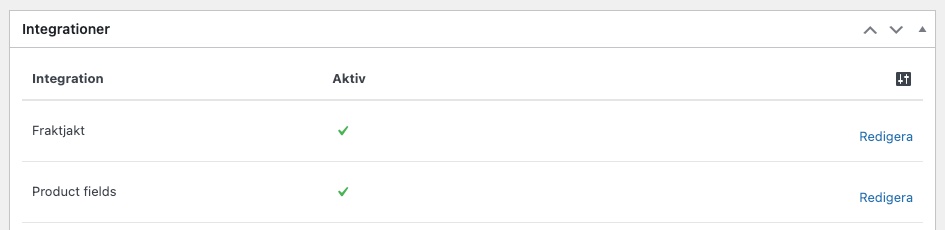
By clicking Edit, the following settings page is shown:
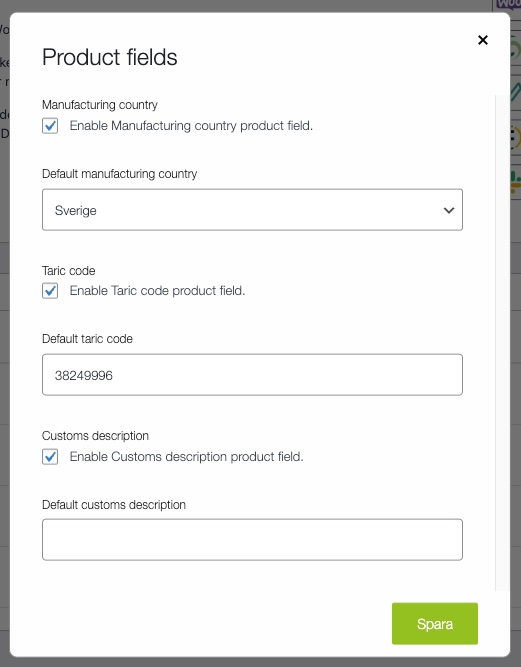
Here you can enable the following fields:
- Country of origin / Manufacturing country
- Commodity code / Taric code
- Customs description
For each field you can set a default value. This value is then sent to Fraktjakt for all products that do not have another value specified on the product itself. On the individual product pages you can then, under --> Product data --> Shipping, see the product fields you have enabled in the settings. By entering a value in these fields, those values are used instead of the one you set as the default value.
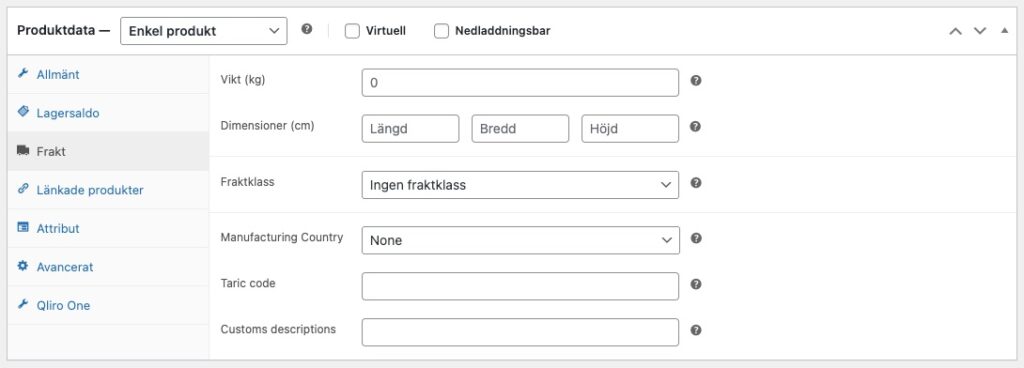
Variable products
For variable products, the fields on the product’s Shipping tab act as default values for all variations. Each variation can then override the default value with its own value directly in the variation panel.
If a field is left empty on a variation, the product’s default value is used automatically instead.
| Field | Default value set on | Overridden per variation |
|---|---|---|
| Manufacturing country | The product’s Shipping tab | Yes – leave empty to inherit the default value |
| Taric code | The product’s Shipping tab | Yes – leave empty to inherit the default value |
| Customs description | The product’s Shipping tab | Yes – leave empty to inherit the default value |
Custom code
Through custom code or other plugins you can also send information to Fraktjakt.
Country of origin
We try to find the country of origin via the following fields on the product (or the product variation in the case of a variable product).
- Metadata named
_kroconnect_manufacturing_country. This name is used by the Product fields integration described above. - Metadata named
country. - Metadata named
Country. - Product attribute named
country. - Product attribute named
Country. Default manufacturing countryfrom the Product fields integration.
Du kan även använda filtret kroconnect_fraktjakt_commodity_country_of_manufacture för att programmatiskt lägga till land från data sparat på annat ställe. Filtret används på följande sätt:
add_filter('kroconnect_fraktjakt_commodity_country_of_manufacture', 'custom_fraktjakt_commodity_manufacturing_country', 10, 2 );

function custom_fraktjakt_commodity_manufacturing_country( $manufacturing_country, $product ) {
    return $product->get_meta( '_my_custom_manufacturing_country', true );
}
Description
We try to find the description via the following fields on the product (or the product variation in the case of a variable product).
- Metadata named
_kroconnect_customs_description. This name is used by the Product fields integration described above. - Metadata named
customs_description. - Product attribute named
customs_description. - The product’s title.
You can also use the filter kroconnect_fraktjakt_commodity_description to programmatically add the description from data stored elsewhere. The filter is used as follows:
add_filter('kroconnect_fraktjakt_commodity_description', 'custom_fraktjakt_commodity_description', 10, 2 );

function custom_fraktjakt_commodity_description( $description, $product ) {
    return $product->get_meta( '_my_custom_description', true );
}
The field is limited to 126 characters before it is sent to Fraktjakt. You can change the number of characters through the filter kroconnect_fraktjakt_commodity_description_max_characters.
Commodity code – Taric code
The commodity code, also called Taric code, Tariff code and HS number, is used for goods descriptions in connection with import and export. Read more about commodity codes on the Swedish Customs (Tullverket) page Tulltaxan.
We try to find the taric via the following fields on the product (or the product variation in the case of a variable product).
- Metadata named
_kroconnect_taric_code. This name is used by the Product fields integration described above. - Metadata named
hscode. - Metadata named
taric. - Product attribute named
hscode. - Product attribute named
taric. Default taric codefrom the Product fields integration.
You can also use the filter kroconnect_fraktjakt_commodity_taric to programmatically add the taric from data stored elsewhere. The filter is used as follows:
add_filter('kroconnect_fraktjakt_commodity_taric', 'custom_fraktjakt_commodity_taric', 10, 2 );

function custom_fraktjakt_commodity_taric( $taric_code, $product ) {
    return $product->get_meta( '_my_custom_taric_code', true );
}