Setup and configuration
Kroconnect
KSA for WooCommerce
Last modified:
KSA (Kustom Shipping Assistant) is part of the Kustom Checkout ecosystem and handles shipping within Kustom’s embedded checkout experience. This guide covers how to configure KSA to work with your WooCommerce store via the Kroconnect WooCommerce Connector plugin.
How it works
Instead of installing a separate Kustom Shipping Assistant plugin, this integration uses your existing WooCommerce shipping methods (including display of pickup points from shipping integrations like Fraktjakt, CargonizerConnect and nShift Checkout 2.0) as the shipping services visible in KSA. Kroconnect acts as the bridge between your WooCommerce store and the Kustom portal.
Prerequisites
- An account at kroconnect.com with KSA activated on your WooCommerce connection. Contact Kroconnect to get this set up.
- Kroconnect WooCommerce Connector must be installed and activated. No additional settings within the plugin need to be configured — activating the plugin is sufficient.
- Kustom Checkout for WooCommerce must be installed and active.
- The standalone Kustom Shipping Assistant plugin must not be installed. It will conflict with this integration.
Step 1 — Enable shipping methods in iframe
In the Kustom Checkout for WooCommerce plugin, the Shipping methods in iframe setting must be enabled. See the Kustom Checkout configuration docs for details on where to find this setting.
Step 2 — Configure the Kustom portal
- Log in to your Kustom portal.
- Navigate to Integrations.
- Click on Shipping.
- Click Add new.
- Click Create TMS and fill in the following:
- Name: Kroconnect
- URL:
https://api.kroconnect.com/api/kustom/shipping
- Under Profile information, fill in:
- Name: We recommend using the format
yourdomain.com - Kroconnect. - TMS: Select Kroconnect.
- Identifier: The
Connection IDfor your WooCommerce store, found in Kroconnect. - Key: The
TMSKeyfor KSA, found in Kroconnect.
- Name: We recommend using the format
- Create/save the new profile.
- Select the region you want to enable KSA for by clicking on the new profile and then select specific countries (or Global).
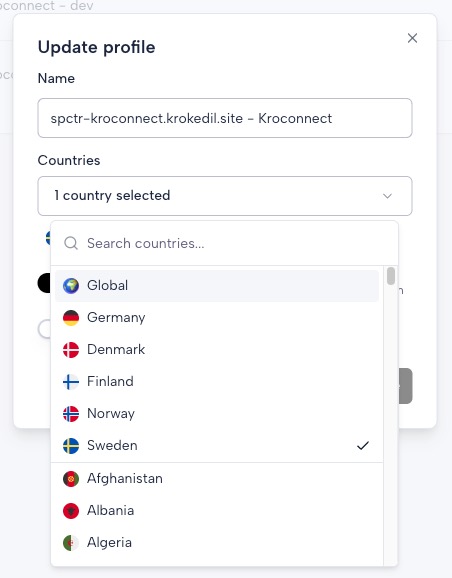
- Update the profile. You should now be able to see shipping methods within the Kustom checkout.